



Seller Tools
Decide exactly who sees what, and take it back anytime
Control who can see full financials, contact details, and documents, and remove access without resending anything.

Common problems with uncontrolled sharing
A few problems tend to show up when information is shared by sending files:

Sensitive financials and contact details can reach people who shouldn't see them.
Buyers can find enough information to identify the business.
Buyers can contact the owner directly.
Files get resent every time access changes.
It's hard to keep track of who has what.
Access you grant and remove yourself
Every listing and document is shared through the platform, so you control visibility from one place.
Choose between a blind listing and a full listing for each audience
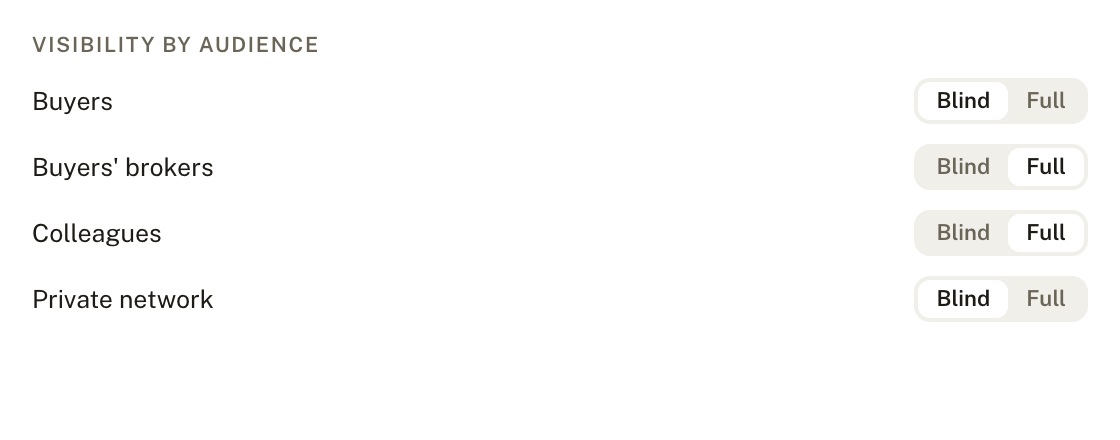

Share with buyers, buyers' brokers, colleagues, or select members of your private network
Grant or remove access at any time
Access changes without resending files
See who has access to what, in one place
Step by step
How access moves through it
1
Set the visibility of the listing
Blind for early interest, full for cleared buyers.
2
Choose who gets access
Buyers, buyers' brokers, colleagues, or your private network.
3
Grant access
People see exactly what you've allowed, nothing more.
4
Remove it whenever you need to
Access closes without resending anything or losing track of who has what.

Control that doesn't depend on memory
Sharing stops being something you track by hand and becomes a setting you manage.

Sensitive financials stay with the people you've cleared
Contact details are limited, so buyers can't bypass you
Access can be cut off the moment a deal falls through
Frequently asked questions
Answers to what brokers usually ask before picking a tool to start with.
Do I need to use every tool, or can I start with just one?
Start wherever makes sense for your workflow. None of these tools require the others to work.
What's the difference between Seller Tools, Buyer Tools, and Developer Tools?
Seller Tools are what a seller interacts with directly. Buyer Tools are what a buyer interacts with. Developer Tools sit underneath both, running the experience under your own brand.
Can I customize the platform to match my brand?
Yes. The White Label Platform runs the entire client experience under your own branding and domain.
Do these tools work together automatically?
Yes. Seller intake, valuation, and listings all pull from the same source of information.
Can I see a tool in action before committing?
Schedule a demo, or sign up directly on the three self-serve tools: Seller Onboarding & Client Intake, Buyer Intake & Qualification, and the Business Valuation Calculator.


Connect


